
Macros in Photo Supreme
Macro Commands
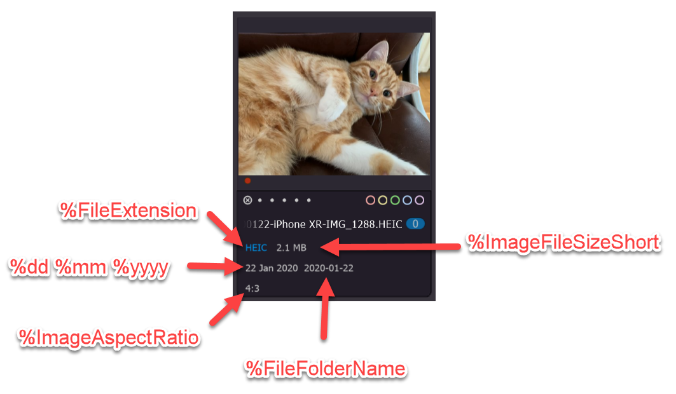
Macro Commands are variables that represent specific pieces of information and are replaced with the actual data they signify. For instance, the macro command %FileName will be substituted with the file name of the corresponding image. Typically, Macro Commands begin with the percent sign (%).
Additionally, you can enhance these commands with optional parameters enclosed in braces. For example, %FileName{left=5;lowercase=y} will return the first five characters of the file name in lowercase.
Macro Commands can be utilized in various contexts, including custom thumbnail information, renaming items, creating custom fields, applying filters, sorting, and more. In its most advanced usage, you can even define macros that execute scripts to produce results. However, that topic will be covered later in the manual.
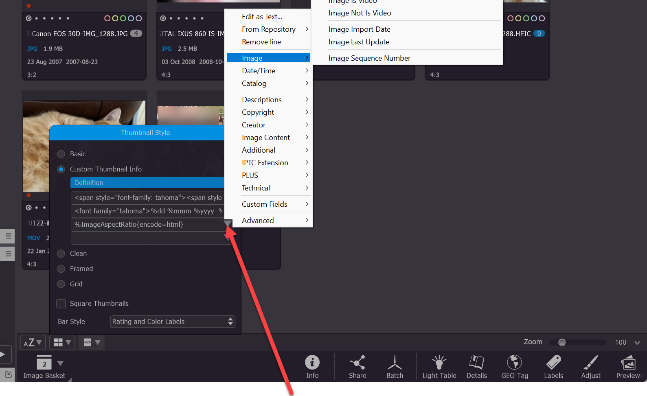
The numerous macro commands might seem daunting at first, but there's no need to worry—you don't have to memorize all the names. You can easily select them from a list that features meaningful names for your convenience.